
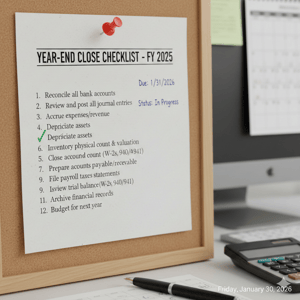
At a glance: A clean year‑end close comes down to three things: reconcile every account, pull a consistent set of reports, and package everything neatly for your tax preparer. Finish with a quick post‑close review so you start the new year with clear priorities.
Quick action: Copy the checklist and paste it into your task tool or spreadsheet.
What to reconcile (banks, cards, loans)
For a true close, reconcile every balance sheet account that moves cash—or claims it does.
-
Bank accounts: Operating, savings, IOLTA/trust (if applicable), deposit/clearing accounts.
-
Credit cards & charge cards: Confirm statement‑end balances and unresolved transactions.
-
Loans/lines of credit: Tie GL balances to lender statements; record year‑end interest.
-
Suspense/“ask my accountant” buckets: Zero them out or add notes for your tax pro.
- Undeposited Funds: Confirm all amounts as of 12/31 are valid and will deposit in January.
Tip: If a statement exists, reconcile it. If it doesn’t (e.g., intercompany or clearing), create a tie‑out schedule that shows how you got to the ending balance.
What to pull (consistent reports, same dates)
Export all reports for the same period (Jan 1–Dec 31) and as‑of 12/31 where noted.
-
Profit & Loss (P&L)
-
Balance Sheet – as of 12/31.
- General Ledger
- Trial Balance – as of 12/31.
-
A/R Aging (as of 12/31) – review old receivables.
-
A/P Aging (as of 12/31) – confirm what’s actually payable.
-
Fixed asset additions/disposals – note large equipment or build‑outs.
-
Payroll annual totals – match to W‑2/W‑3.
-
1099's filed
-
Sales by state – important for multi‑state compliance and local filings.
How to package it for your tax preparer (one‑folder rule)
Make it effortless to review:
-
One folder named
YYYY_Tax_Package_{Company}. -
File names like
2025_AF_Profit-and-Loss.pdf(YYYY_Client_ReportName). -
Include a short cover note listing: accounting method (cash/accrual), software (QBO/Xero/Studio Designer), unusual items, and any open questions.
Why it matters: A tidy package prevents back‑and‑forth, reduces adjustments, and speeds filing—especially if you operate across multiple states or have complex procurement workflows.
Common pitfalls that slow everything down
-
Negative liabilities or inventory/WIP oddities: Usually a sign of mapping/posting errors.
-
Sales‑by‑state blind spots: Project work and installations can create filings outside HQ.
-
“Uncategorized expense” bloat: Add memos or categorize—don’t leave guesswork.
A 30‑minute post‑close review (turn data into action)
You don’t close the books to admire them—you close to make decisions. Block 30 minutes for this:
-
Profit drivers: Which projects, services, or client types produced outsized margin?
-
Problem accounts: Which expense lines or balance‑sheet items require cleanup?
-
Cash discipline: Are you enforcing retainers/milestones and net terms consistently?
-
Capacity & pricing: Did utilization stay healthy? Any projects under‑scoped or under‑priced?
-
Three‑by‑three: List 3 wins, 3 issues, and 3 actions for the next 90 days.
Year-End Close Checklist
RECONCILE
[ ] All bank accounts (operating, savings, IOLTA/trust, deposit/clearing)
[ ] All credit/charge cards (match to statements)
[ ] Loans/lines of credit (GL ties to lender; record interest)
[ ] Suspense/“ask my accountant” accounts cleared or noted
[ ] Confirm Undeposited Funds are valid and will deposit in January.
REVIEW & CLEAN
[ ] Uncategorized transactions resolved (add memos if needed)
[ ] Old A/R addressed (collect, credit, or write off with notes)
[ ] A/P verified (close out duplicates; confirm vendor status and addresses)
[ ] Fixed asset changes recorded (additions, disposals, depreciation as applicable)
EXPORT (SAME PERIOD: 01/01–12/31; AS-OF 12/31 WHERE NOTED)
[ ] Profit & Loss (annual)
[ ] Balance Sheet (as of 12/31)
[ ] General Ledger (Full year)
[ ] Trial Balance (as of 12/31)
[ ] A/R Aging (as of 12/31)
[ ] A/P Aging (as of 12/31)
[ ] Payroll annual totals → match W‑2/W‑3
[ ] W‑9s on file
[ ] Sales by State (annual totals)
PACKAGE
[ ] One folder: "YYYY_Tax_Package_{Company}"
[ ] File naming: "YYYY_Client_ReportName.ext"
[ ] Cover note: accounting method, software, unusual items, open questions, index of attachments
POST‑CLOSE REVIEW (30 MIN)
[ ] 3 wins, 3 issues, 3 actions for next 90 days
↑ Copy the checklist and paste it into your task tool or spreadsheet.
FAQ
What reports do I actually need to send to my tax preparer?
P&L, Balance Sheet, Trial Balance, General Ledger, A/R and A/P aging as of 12/31, Payroll W-3 and W-2's, 1099's filed, and sales‑by‑state totals. Add notes for any unusual transactions.
Do I need to reconcile credit cards and loans too?
Yes. Anything with a statement should be reconciled. For non‑statement balances (clearing or intercompany), include a tie‑out schedule.
Why “sales by state” for service firms?
Project work, installations, or on‑site services can create filing or reporting obligations outside your home state. A state‑level summary speeds compliance reviews.
What’s the fastest way to turn the close into action?
Use the 30‑minute review: identify 3 wins, 3 issues, and 3 actions that shape your next‑quarter priorities (cash discipline, pricing, capacity, and cleanup tasks).
Disclaimer: This article is for general education and may not reflect your specific facts. Consult your tax professional for advice.
